A mini smart plug is a small device that fits between your standard wall outlet and an appliance, allowing you to control it remotely via a smartphone app or voice commands. These compact devices connect to your home’s 2.4GHz Wi-Fi network, transforming any non-smart appliance into a smart one, offering features like remote control, scheduling, voice control, and often energy monitoring. They are a highly affordable entry point into home automation, providing convenience, enhanced security through ‘faux-cupancy,’ and potential energy savings by eliminating ‘vampire power’ from electronics.
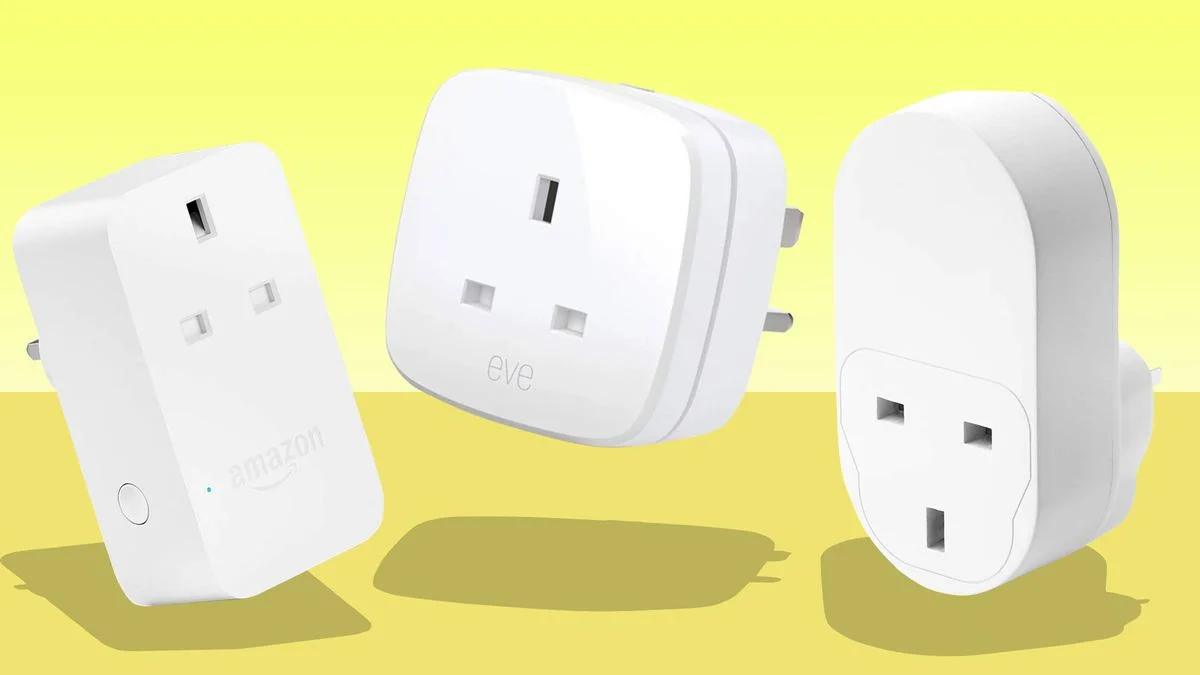
What Exactly is a Mini Smart Plug and How Does It Work?
A mini smart plug is a small device that fits between your standard wall outlet and the appliance you want to control. Think of it as a smart, remote-controlled middleman for your electronics. It connects to your home’s Wi-Fi network, allowing you to turn any “dumb” appliance into a smart one, controllable right from your smartphone, no matter where you are. For shop curated smart home on this site.
At its core, the technology is brilliantly simple. Inside the compact casing is a Wi-Fi chip and a relay. When you tap a button in its companion app, a signal travels over the internet to your home router, which then tells the smart plug’s relay to either open (turn off power) or close (turn on power). It’s the magic of the Internet of Things (IoT) brought down to a practical, everyday level.
Key Features You Can Expect
Most mini smart plugs come packed with features that go far beyond a simple on/off switch. Here’s what you’ll typically find:
- Remote Control: The primary function. Turn devices on or off from anywhere with an internet connection.
- Scheduling and Timers: Set your coffee maker to start brewing at 7 AM, or have your lights turn on automatically at sunset. This is automation at its finest.
- Voice Control: The real game-changer. Most plugs integrate seamlessly with voice assistants like Amazon Alexa, Google Assistant, and sometimes Apple’s Siri. A simple “Hey Google, turn on the fan” is all it takes.
- Energy Monitoring: Many models include the ability to track how much electricity an appliance is using. This is fantastic for identifying energy hogs and cutting down your utility bills.
- Compact Design: The “mini” in their name is crucial. Unlike their bulky predecessors, these plugs are designed to occupy only one outlet, leaving the other one free for use.
Our In-Depth Mini Smart Plug Review: What to Look For
Choosing the right mini smart plug can feel overwhelming with so many options on the market. But don’t you worry, we’ve broken it down into the essential factors to consider. This isn’t just a list; it’s your roadmap to making a smart purchase.
| Feature | Why It Matters | Smart Plug Top’s Recommendation |
|---|---|---|
| Compatibility | Your plug needs to play nice with your existing smart home ecosystem (Alexa, Google Home, Apple HomeKit). | Look for plugs that list all three major platforms. Matter certification is the new gold standard for future-proofing. |
| App Interface | A clunky, confusing app will ruin the experience. The app should be intuitive, responsive, and easy to navigate for scheduling and control. | Download the app before you buy (if possible) or read user reviews specifically about the app’s usability. |
| Size and Shape | A poorly designed plug can block the adjacent outlet, defeating the purpose of being “mini.” | Opt for round or slim rectangular designs that clearly show they won’t obstruct other outlets. |
| Energy Monitoring | If saving money is a priority, this is a must-have. It gives you concrete data on your energy consumption. | While it may cost a few dollars more, the long-term savings often justify the initial investment. |
| Safety Certification | This is non-negotiable. You’re dealing with electricity. The plug must be certified by a recognized body (like UL or ETL). | Never buy a smart plug that doesn’t clearly display its safety certifications on the product or packaging. |
How Do You Set Up a Mini Smart Plug?
|
Our Picks for the Best Smart Plug in 2026
As an Amazon Associate, we earn from qualifying purchases.
|
||
| Num | Product | Action |
|---|---|---|
| 1 | Amazon Basics Smart Plug, Works with Alexa Only, 2.4 GHz Wi-Fi, No Hub Required, 4-Pack, White |

|
| 2 | Kasa Smart Plug Ultra Mini 15A, Smart Home Wi-Fi Outlet Works with Alexa, Google Home & IFTTT, No Hub Required, UL Certified, 2.4G WiFi Only, 2 Count (Pack of 1)(EP10P2) , White |
|
| 3 | Kasa Smart Plug Mini 15A, Smart Home Wi-Fi Outlet Works with Alexa, Google Home & IFTTT, No Hub Required, UL Certified, 2.4G WiFi Only, 4-Pack(EP10P4) , White |
|
| 4 | Amazon Basics Smart Plug, Works with Alexa Only, 2.4 GHz Wi-Fi, No Hub Required, 2 Pack, White |
|
| 5 | Govee Smart Plug, WiFi Plugs Work with Alexa & Google Assistant, Smart Outlet with Timer & Group Controller, WiFi Outlet for Home, No Hub Required, ETL & FCC Certified, 2.4G WiFi Only, 4 Pack |
|
| 6 | Govee Smart Plug, WiFi Plugs Work with Alexa & Google Assistant, Smart Outlet with Timer & Group Controller, WiFi Outlet for Home, No Hub Required, ETL & FCC Certified, 2.4G WiFi Only, 2 Pack |
|
| 7 | Kasa Smart Plug Mini 15A, Apple HomeKit Supported, Smart Outlet Works with Siri, Alexa & Google Home, UL Certified, App Control, Scheduling, Timer, 2.4G WiFi Only, 4 Count (Pack of 1) (EP25P4), White |
|
| 8 | TP-Link Tapo Matter Supported Smart Plug Mini, Compact Design, 15A/1800W Max, Super Easy Setup, Works with Apple Home, Alexa & Google Home, UL Certified, 2.4G Wi-Fi Only, White, Tapo P125M(3-Pack) |
|
| 9 | Kasa Smart Plug HS103P2, Smart Home Wi-Fi Outlet Works with Alexa, Echo, Google Home & IFTTT, No Hub Required, Remote Control,15 Amp,UL Certified, (Pack of 2) White |
|
| 10 | Kasa Smart Plug HS103P4, Smart Home Wi-Fi Outlet Works with Alexa, Echo, Google Home & IFTTT, No Hub Required, Remote Control, 15 Amp, UL Certified, 4-Pack, White |
|
Worried it’s going to be a technical nightmare? Take a deep breath. I remember setting up my first one, and frankly, it was easier than pairing a new Bluetooth speaker. The process is remarkably straightforward for most brands.
- Download the App: First things first, head to your phone’s app store (iOS or Android) and download the manufacturer’s dedicated app. Create an account if required.
- Plug It In: Take your mini smart plug and plug it into the desired wall outlet. A small indicator light will usually start blinking, signaling it’s in pairing mode.
- Connect to Wi-Fi: Open the app and follow the on-screen instructions to add a new device. You’ll typically need to select the plug from a list and then enter your home’s 2.4GHz Wi-Fi password. A quick tip: most smart home gadgets don’t work on 5GHz networks, so make sure your phone is connected to the 2.4GHz band during setup.
- Name Your Device: Give your plug a logical name like “Living Room Lamp” or “Bedroom Fan.” This is especially important for voice commands later on.
- Link to Voice Assistant (Optional): Open your Alexa or Google Home app, search for the smart plug’s brand “skill” or “service,” and link your accounts. Once linked, your new plug will be available for voice control.
And that’s it! You’re ready to control your appliance from anywhere in the world.
Creative Ways to Use Your Mini Smart Plug
Okay, you’ve mastered turning a lamp on and off. Impressive. But the real fun begins when you think outside the box. Here are some of my personal favorite ways to leverage these tiny titans of tech.
- The “Faux-cupancy” Security System: Going on vacation? Use the scheduling feature to have lamps and a radio turn on and off at various times in the evening. It creates the illusion that someone is home, acting as a simple but effective burglar deterrent.
- The Perfect Morning Routine: Plug your non-smart coffee maker into a smart plug. Set a schedule for it to turn on 10 minutes before your alarm. Waking up to the smell of freshly brewed coffee is a luxury you can afford.
- The Pet Protector: During a summer heatwave, plug a fan into a smart plug in the room where your pet hangs out. If you see the temperature rising on your weather app, you can turn on the fan for them remotely.
- The Green Thumb’s Assistant: Connect your indoor grow lights to a smart plug and schedule them to provide the perfect amount of “daylight” for your plants, ensuring they thrive even when you’re not home.
- The Wi-Fi Rescuer: Is your internet router in an awkward spot and needs to be reset occasionally? Plug it into a smart plug. When the internet goes down, you can simply toggle the power from your phone (using cellular data, of course) instead of crawling behind the couch.
“We’re moving beyond simple commands and into an era of ambient computing. The humble smart plug is the entry point for millions into a home that anticipates their needs. It’s not just about convenience; it’s about creating a more responsive and efficient living environment.”
— Dr. Alistair Finch, IoT Technology Analyst
Can Smart Plugs Really Save You Money on Energy Bills?
Yes, they absolutely can, primarily by tackling “vampire power.” Also known as standby power, this is the electricity consumed by electronics even when they are turned off. Your TV, game console, and microwave are all sipping energy 24/7. A mini smart plug with energy monitoring can help you identify these culprits. By scheduling these devices to be completely powered off overnight or while you’re at work, you can cut this wasteful consumption and see a noticeable difference in your monthly bill.
Tying It All Together: Your Smart Home Ecosystem
A single smart plug is useful, but its true power is unlocked when it becomes part of a larger system. Integrating it with Amazon Alexa or Google Home allows you to create Routines.
For example, you could create a “Good Night” routine. When you say “Alexa, good night,” she could turn off all your smart plug-controlled lights, turn off the TV, and turn on a fan in your bedroom, all with a single command. This level of seamless automation is what makes a house feel truly smart. The emergence of the Matter protocol is making this even easier, aiming to create a universal standard where devices from different brands can all communicate effortlessly.
Frequently Asked Questions
Q: Do mini smart plugs use a lot of electricity themselves?
A: No, they are incredibly efficient. A smart plug in standby mode typically uses less than 1 watt of power. The energy it saves by turning off vampire power devices far outweighs its own minimal consumption.
Q: Can I use a mini smart plug with a power strip?
A: Yes, you can plug a power strip into a smart plug. This allows you to control multiple devices at once (e.g., your entire entertainment center). Just be sure not to exceed the smart plug’s maximum wattage rating.
Q: What happens if the Wi-Fi goes down?
A: If your internet connection is down, you won’t be able to control the plug remotely via the app or voice commands. However, any schedules you’ve pre-set are usually stored locally on the plug itself and will continue to run. You can also always turn it on or off manually using the physical button on the device.
Q: Are mini smart plugs safe for high-power appliances?
A: It depends. Always check the maximum amperage and wattage rating of the smart plug. They are generally safe for lamps, fans, coffee makers, and small electronics. For high-draw appliances like space heaters or air conditioners, you must use a heavy-duty smart plug specifically designed for that purpose.
Q: Do I need a smart home hub to use a mini smart plug?
A: Not usually. The vast majority of mini smart plugs today are Wi-Fi-based and connect directly to your router, so no extra hub is required. Hubs are typically needed for devices that use other protocols like Zigbee or Z-Wave.
The Final Verdict
So, after this deep-dive mini smart plug review, what’s the verdict? These devices are, without a doubt, one of the best and most affordable entry points into the world of home automation. They offer an incredible blend of convenience, security, and potential energy savings packed into a tiny, user-friendly package. Whether you’re a tech enthusiast looking to build a fully automated home or just someone who wants to stop worrying if they left the iron on, the mini smart plug is a worthy addition to any household. Your smarter home is just one plug away.
Frequently Asked Questions
How much electricity do mini smart plugs consume themselves?
Mini smart plugs are highly efficient, typically using less than 1 watt of power in standby mode. This minimal consumption is far outweighed by the energy savings achieved by turning off 'vampire power' devices.
Can a power strip be connected to a mini smart plug?
Yes, you can plug a power strip into a smart plug to control multiple devices simultaneously, such as an entire entertainment center. Always ensure the total wattage of devices connected to the power strip does not exceed the smart plug's maximum rating.
What happens to smart plug functionality if the home Wi-Fi goes down?
If your internet connection fails, remote control via the app or voice commands will be unavailable. However, any schedules pre-set on the smart plug are usually stored locally and will continue to operate. Manual control using the physical button on the device also remains an option.
Are mini smart plugs suitable for high-power appliances like heaters?
The suitability depends on the smart plug's maximum amperage and wattage rating. While generally safe for low-to-medium draw appliances like lamps and coffee makers, high-power devices such as space heaters or air conditioners require a heavy-duty smart plug specifically designed for higher loads.
Is a separate smart home hub necessary to use a mini smart plug?
No, a separate smart home hub is not usually required. Most mini smart plugs today are Wi-Fi-based and connect directly to your home router, eliminating the need for an additional hub, which is typically reserved for Zigbee or Z-Wave devices.
Smart home that does not lock you in
Free PDF — protocol compatibility matrix for 30 hubs and devices.
The remote control aspect of these mini smart plugs is fantastic. I can turn off my kids’ gaming console from my phone when it’s bedtime, even if I’m not home. It’s a small device but makes a big difference in managing household electronics. Plus, the energy monitoring is a nice bonus to see where power is being used.
These plugs are great for cutting down on vampire power. I’ve got a few on my entertainment system and my computer setup, and I’ve already noticed a small dip in my energy bill. The voice control with Alexa works flawlessly, which is a huge plus for me. It’s a simple way to make your home a bit smarter without a huge investment.
I love how these mini smart plugs let me control my old coffee maker from bed! The scheduling feature is a game-changer for my mornings. It was super easy to set up with my 2.4GHz Wi-Fi, and the app is really intuitive. Definitely recommend for anyone wanting to add some convenience to their routine.
I got one of these to try out the ‘faux-cupancy’ feature for when I’m away, and it works okay for turning lamps on and off. My main gripe is that it sometimes loses connection to the Wi-Fi, and I have to unplug it and plug it back in to get it working again. It’s not a deal-breaker, but it can be a bit annoying.