Welcome to Smart Plug Top, where we demystify smart home technology one device at a time. If you’ve ever found yourself wishing you had more outlets or more control over your devices, you’re in the right place. We’re diving deep with this Dual Outlet Smart Plug Review to uncover whether these two-in-one gadgets are the unsung heroes of home automation. Are they just a gimmick, or a genuinely brilliant way to upgrade your home? Let’s plug in and find out.
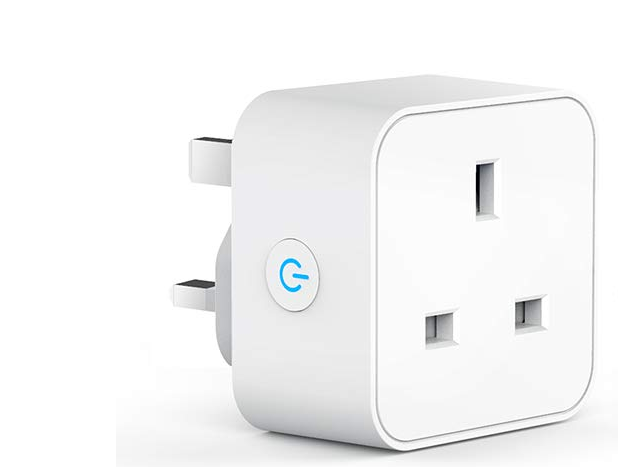
What Exactly Is a Dual Outlet Smart Plug?
At its core, a dual outlet smart plug is a single device that plugs into a standard wall socket (like the Type B common in North America) but provides two independently controllable smart outlets. Think of it as getting two smart plugs for the price, and space, of one. It’s a simple concept, but the execution and features are what separate the best from the rest.
Unlike their single-outlet predecessors that have been around for a few years, these dual models address a very common pain point: the chronic shortage of wall outlets behind TVs, desks, and kitchen counters. They represent the natural evolution of smart home convenience, packing more functionality into a more efficient form factor.
Key Features to Look For in 2024
Not all smart plugs are created equal. When you’re shopping around, it’s easy to get lost in technical jargon. Here’s a breakdown of the features that really matter.
Independent vs. Paired Control
This is the most critical feature. A true dual outlet smart plug allows you to control each socket individually. You could have your lamp turn on while your fan stays off, all from the same plug. Some cheaper models might only let you control both outlets as a single unit, which largely defeats the purpose. Always check for independent control.
Energy Monitoring: Your Wallet’s Best Friend
Want to find out which appliance is the secret energy vampire in your home? Get a plug with energy monitoring. This feature provides real-time and historical data on the power consumption of whatever is plugged into it. It’s an eye-opening tool that can help you make smarter energy choices and lower your electricity bill. We have a whole guide on [how to use smart plugs to save money] if you want to learn more.
Scheduling, Timers, and Routines
This is where the “smart” part truly shines. A good dual outlet smart plug will offer robust scheduling options through its companion app.
- Schedules: Set your coffee maker to turn on at 6:55 AM and a lamp in the living room to turn on at sunset.
- Timers: Automatically turn off a space heater or a phone charger after a set amount of time.
- Away Mode: This feature randomly turns connected lights on and off to simulate occupancy, which is a fantastic security deterrent when you’re on vacation.
Voice Assistant Compatibility
“Hey Google, turn on the bedroom fan.” “Alexa, good morning.” Being able to control your devices with just your voice is a game-changer. Ensure the plug you choose is compatible with your preferred ecosystem, whether it’s Amazon Alexa, Google Assistant, or Apple HomeKit (Siri). Most modern plugs work seamlessly with the big two, but HomeKit compatibility can sometimes be more exclusive.
Our In-Depth Dual Outlet Smart Plug Review and Setup
To really put these devices to the test, I grabbed a popular model and set it up in my home office, a notorious black hole for available outlets. My goal was simple: control my desk lamp and my secondary monitor charger independently. Here’s a first-hand account of how it went.
The unboxing was straightforward—just the plug and a small quick-start guide. The setup process, which is often a point of frustration with smart devices, was surprisingly painless.
- Plug It In: I simply plugged the dual outlet smart plug into the wall. A small LED indicator light started blinking, signaling it was ready to pair.
- Download the App: I scanned the QR code on the box to download the manufacturer’s app (in this case, TP-Link’s Kasa app, but others like Smart Life are also common).
- Create an Account: A quick account setup was required, which is standard for most smart home devices.
- Connect to Wi-Fi: The app automatically detected the new plug. I followed the on-screen prompts to connect it to my home’s 2.4GHz Wi-Fi network. A quick tip: most smart plugs do not work on 5GHz networks, so make sure your router has a 2.4GHz band enabled.
- Name Your Outlets: This was the best part. The app prompted me to name each of the two outlets. I named them “Desk Lamp” and “Monitor Power.”
From unboxing to full functionality, the entire process took less than five minutes. I was immediately able to turn my lamp on and off from my phone while the monitor charger remained on. The real magic happened when I linked it to my Google Home, and could simply say, “Hey Google, turn off the desk lamp” before leaving the room. This experience solidifies why a dual outlet smart plug review like this is so important—it’s about the seamless integration into daily life.
|
Our Picks for the Best Smart Plug in 2026
As an Amazon Associate, we earn from qualifying purchases.
|
||
| Num | Product | Action |
|---|---|---|
| 1 | Amazon Basics Smart Plug, Works with Alexa Only, 2.4 GHz Wi-Fi, No Hub Required, 4-Pack, White |

|
| 2 | Govee Smart Plug, WiFi Plugs Work with Alexa & Google Assistant, Smart Outlet with Timer & Group Controller, WiFi Outlet for Home, No Hub Required, ETL & FCC Certified, 2.4G WiFi Only, 2 Pack |
|
| 3 | Kasa Smart Plug Mini 15A, Smart Home Wi-Fi Outlet Works with Alexa, Google Home & IFTTT, No Hub Required, UL Certified, 2.4G WiFi Only, 4-Pack(EP10P4) , White |
|
| 4 | Kasa Smart Plug HS103P4, Smart Home Wi-Fi Outlet Works with Alexa, Echo, Google Home & IFTTT, No Hub Required, Remote Control, 15 Amp, UL Certified, 4-Pack, White |
|
| 5 | Kasa Smart Plug Ultra Mini 15A, Smart Home Wi-Fi Outlet Works with Alexa, Google Home & IFTTT, No Hub Required, UL Certified, 2.4G WiFi Only, 2 Count (Pack of 1)(EP10P2) , White |
|
| 6 | Amazon Basics Smart Plug, Works with Alexa Only, 2.4 GHz Wi-Fi, No Hub Required, 2 Pack, White |
|
| 7 | Govee Smart Plug, WiFi Plugs Work with Alexa & Google Assistant, Smart Outlet with Timer & Group Controller, WiFi Outlet for Home, No Hub Required, ETL & FCC Certified, 2.4G WiFi Only, 4 Pack |
|
| 8 | Kasa Smart Plug HS103P2, Smart Home Wi-Fi Outlet Works with Alexa, Echo, Google Home & IFTTT, No Hub Required, Remote Control,15 Amp,UL Certified, (Pack of 2) White |
|
| 9 | Kasa Smart Plug Mini 15A, Apple HomeKit Supported, Smart Outlet Works with Siri, Alexa & Google Home, UL Certified, App Control, Scheduling, Timer, 2.4G WiFi Only, 4 Count (Pack of 1) (EP25P4), White |
|
| 10 | TP-Link Tapo Matter Supported Smart Plug Mini, Compact Design, 15A/1800W Max, Super Easy Setup, Works with Apple Home, Alexa & Google Home, UL Certified, 2.4G Wi-Fi Only, White, Tapo P125M(3-Pack) |
|
Creative Ways to Use Your Dual Outlet Smart Plug
Beyond the obvious lamp or fan, these devices are incredibly versatile. Here are a few ideas to get your creative juices flowing:
- The Ultimate Coffee Station: Plug your coffee grinder and coffee maker into the same dual plug. Create a “Morning Coffee” routine that grinds the beans first, then starts brewing a minute later.
- The Entertainment Center Tamer: Control your TV and your soundbar independently. Set a schedule to completely cut power to them overnight to eliminate phantom power draw.
- The Holiday Decor Duo: Perfect for controlling two different sets of holiday lights or animated decorations with unique schedules from a single outlet.
- The Pet Comfort Zone: Connect a heat lamp and a small water fountain for your reptile or other pet. You can schedule the lamp to mimic a natural day/night cycle.
“We are moving beyond simple on/off commands. The future of the smart home lies in ambient automation, where devices like dual outlet plugs act as the invisible, intelligent backbone of our living spaces, anticipating our needs and optimizing our environment for comfort and efficiency.”
– Dr. Alistair Finch, Smart Home Technology Analyst
Can a Smart Plug Really Save You Money?
Yes, it absolutely can. Many electronics continue to draw a small amount of power even when they are turned “off.” This is often called phantom load or vampire power. While a single device might not seem like much, it adds up across your entire home. A dual outlet smart plug with energy monitoring lets you identify these culprits and use schedules to cut their power completely when not in use.
Think about your entertainment center. The TV, game console, and sound system all sip power 24/7. By putting them on a smart plug scheduled to turn off from midnight to 6 AM, you could save a noticeable amount on your energy bill over the course of a year. Check out our [deep dive on smart home energy savings] for more tips.
Integrating Into Your Smart Home Ecosystem
A smart plug is great on its own, but it’s even better as part of a larger team. Integration is key to a truly connected home.
The Big Three: Google, Amazon, and Apple
Most dual outlet smart plugs integrate flawlessly with Amazon Alexa and Google Assistant. This allows you to include them in powerful routines. For example, a single “Goodnight” command could turn off all your smart-plug-connected lights, lock your smart locks, and adjust your smart thermostat.
Apple HomeKit can be a bit trickier. If you’re an Apple user, make sure you look for the “Works with Apple HomeKit” logo on the packaging to ensure a smooth, native experience within the Home app.
A Word on Matter and Future-Proofing
Matter is a newer smart home connectivity standard designed to make devices from different companies work together seamlessly. While not all current smart plugs support it, buying one that is “Matter-certified” is a good way to future-proof your investment. It ensures your plug will likely work with new devices and ecosystems for years to come.
Checklist: Choosing the Right Dual Outlet Smart Plug
- [ ] Independent Control: Can you control each outlet separately?
- [ ] Energy Monitoring: Does it track power consumption?
- [ ] Compact Design: Does it block the other wall outlet?
- [ ] App Quality: Is the companion app well-reviewed and easy to use?
- [ ] Ecosystem Compatibility: Does it work with your voice assistant (Alexa, Google, Siri)?
- [ ] Safety Certifications: Is it UL or ETL certified for electrical safety?
- [ ] Connectivity: Does it support Matter for future compatibility?
Frequently Asked Questions
What if my Wi-Fi goes down?
If your Wi-Fi is down, you will lose remote control and scheduling features. However, most dual outlet smart plugs have a physical power button on the device itself, so you can still turn your appliances on and off manually.
Are dual outlet smart plugs safe for high-power appliances?
It depends. Always check the maximum power rating (usually listed in watts or amps) of the smart plug. They are generally safe for lamps, fans, and small electronics, but you should be cautious with high-draw appliances like space heaters, air conditioners, or large power tools. Never exceed the plug’s maximum load.
Do I need a separate smart home hub?
For most dual outlet smart plugs, no. The majority of popular models today connect directly to your home’s Wi-Fi network and are controlled via their own app or a voice assistant app. Some plugs, particularly those using Zigbee or Z-Wave protocols, do require a compatible hub.
Can I plug a power strip into a dual outlet smart plug?
While technically possible, it is generally not recommended by manufacturers. This practice, known as “daisy-chaining,” can overload the smart plug and create a fire hazard. It’s always safest to plug appliances directly into the smart plug.
How much electricity does the smart plug itself use?
A smart plug consumes a very small amount of power to maintain its Wi-Fi connection and internal circuitry, typically between 1-2 watts. The energy savings from cutting phantom power to connected devices almost always far outweighs the plug’s own consumption.
Conclusion: A Small Device with a Big Impact
After a thorough dual outlet smart plug review, the verdict is clear: this is one of the most practical and cost-effective upgrades you can make to your home. It solves the common problem of limited outlets while giving you unprecedented control, convenience, and insight into your energy usage. It’s the perfect entry point for anyone curious about smart home technology and a valuable addition for seasoned veterans looking to expand their setup. By choosing a quality device, you’re not just buying a gadget; you’re investing in a smarter, more efficient, and more automated lifestyle.