Picture this: You wake up not to a blaring alarm, but to the gentle aroma of freshly brewed coffee. Your bedside lamp slowly brightens, mimicking a natural sunrise. Downstairs, the living room is already warm and cozy. Sounds like a scene from a futuristic movie, right? Well, it’s not. This level of everyday magic is easily achievable with one of the most accessible smart home gadgets on the market: the Smart Plug With Timer Function. This small but mighty device is your first step into a more convenient, efficient, and automated home. Let’s dive in and see how.
What Exactly Is a Smart Plug Anyway?
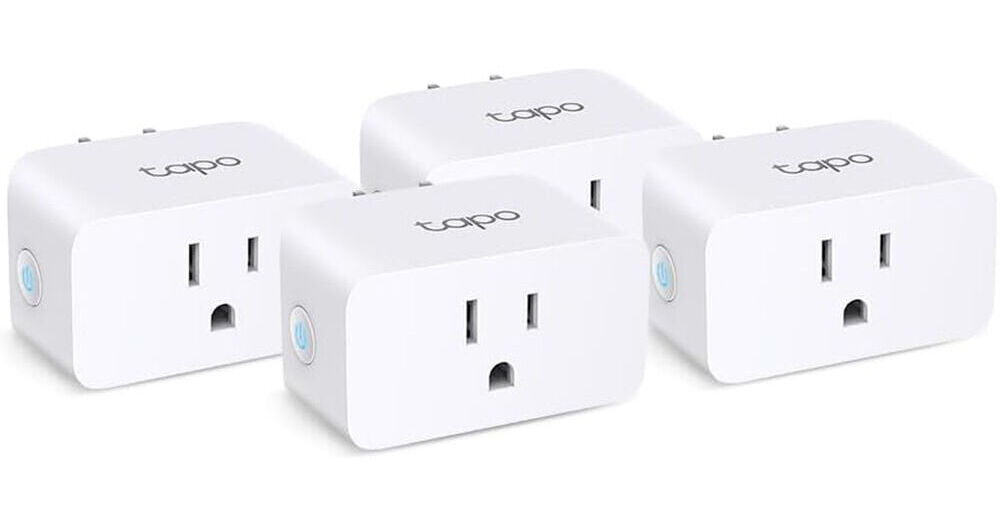
At its core, a smart plug is a simple adapter that you plug into a regular wall outlet. You then plug your “dumb” appliance—like a lamp, fan, or coffee maker—into the smart plug. Suddenly, that old-school appliance has a brain. It’s connected to your home’s Wi-Fi network, allowing you to control it from anywhere using your smartphone.
It’s a far cry from the clunky mechanical timers of the past, the ones with the little plastic pins you had to push in. Those were the pioneers, for sure, but they were limited. You had to set them manually, and they ran on a fixed 24-hour cycle. The modern smart plug with timer function is a massive leap forward, offering incredible flexibility and intelligence thanks to the Internet of Things (IoT).
How Does a Smart Plug with Timer Function Work Its Magic?
So, how does this little box turn your floor fan into a genius? The secret sauce is a combination of a few key components: a Wi-Fi chip, a microprocessor, and a relay switch.
- Wi-Fi Connection: The plug connects directly to your home Wi-Fi network, just like your phone or laptop. This is its lifeline to the outside world.
- The App: Every smart plug has a companion app for your smartphone (iOS or Android). This app is your command center.
- The Timer & Schedule: Within the app, you can set incredibly detailed schedules. Want your holiday lights to turn on at sunset and off at 11 PM every day? Done. Need the slow cooker to start at noon so dinner is ready when you get home? Easy. You can create multiple schedules for different days, set countdown timers, or even create “away” modes that randomly turn lights on and off to simulate occupancy.
“The true beauty of a smart plug isn’t just about turning things on and off remotely. It’s about setting up automations that work for your life. It’s about taking one small, repetitive task off your mental to-do list, and then another, and another.”
Essentially, you’re giving your appliances a set of instructions that they follow perfectly, every single time, without you having to lift a finger.
Getting Started: Your First Five Minutes with a Smart Plug
Worried about a complicated setup? Don’t be. Honestly, if you can connect a new phone to your Wi-Fi, you can set up a smart plug. I recently set one up for my espresso machine, and the whole process took less time than brewing a cup.
Here’s a typical step-by-step guide:
- Unbox and Plug It In: Take the smart plug out of the box and plug it into a wall outlet. A small light will usually start blinking, indicating it’s ready to be paired.
- Download the Companion App: Scan the QR code in the manual or search for the brand’s app in the Apple App Store or Google Play Store. Create a free account.
- Connect to Your Wi-Fi: Follow the in-app instructions. This usually involves selecting the smart plug from a list of devices and entering your home’s Wi-Fi password. Pro-tip: Most smart plugs work on a 2.4GHz Wi-Fi band, so make sure your phone is connected to that network during setup.
- Name Your Device: Give your plug a logical name like “Living Room Lamp” or “Coffee Maker.” This is especially important for voice control later on.
- Set Your First Timer: Dive into the app’s scheduling or timer section. Create your first automation! Set your desk fan to turn off in one hour or schedule your bedside lamp to turn on at 7 AM tomorrow. Congratulations, you’re officially a smart home user!
Beyond the Basics: Creative Ways to Use Your Timer
Once you get the hang of basic scheduling, you’ll start seeing opportunities for automation everywhere. The smart plug with timer function is a versatile tool.
- The Perfect Morning Routine: Schedule your coffee maker to start brewing five minutes before your alarm goes off. Plug in an electric kettle and have hot water ready for tea or oatmeal.
- Enhanced Home Security: When you’re on vacation, use the “Away Mode” or set random schedules for lamps and a radio. This creates the illusion that someone is home, which can be a powerful deterrent for potential intruders. You can read more about this in our [guide to smart home security basics].
- The Kitchen Assistant: Use the countdown timer for your slow cooker or pressure cooker. You can also put a timer on a charging station to prevent overcharging your devices overnight.
- Seasonal and Holiday Hero: Automating holiday lights is the most popular use case for a reason. Set them to turn on at dusk and off at your bedtime, and never think about it again for the entire season. It’s also great for seasonal items like portable heaters or dehumidifiers.
- Gentle Wake-Up and Wind-Down: Forget jarring alarms. Plug a lamp into a smart plug and schedule it to turn on at a low brightness 15 minutes before you need to wake up, creating a gentle, artificial sunrise. In the evening, schedule it to turn off after you’re in bed.
|
Our Picks for the Best Smart Plug in 2026
As an Amazon Associate, we earn from qualifying purchases.
|
||
| Num | Product | Action |
|---|---|---|
| 1 | Govee Smart Plug, WiFi Plugs Work with Alexa & Google Assistant, Smart Outlet with Timer & Group Controller, WiFi Outlet for Home, No Hub Required, ETL & FCC Certified, 2.4G WiFi Only, 4 Pack |

|
| 2 | Kasa Smart Plug Ultra Mini 15A, Smart Home Wi-Fi Outlet Works with Alexa, Google Home & IFTTT, No Hub Required, UL Certified, 2.4G WiFi Only, 2 Count (Pack of 1)(EP10P2) , White |
|
| 3 | Kasa Smart Plug Mini 15A, Apple HomeKit Supported, Smart Outlet Works with Siri, Alexa & Google Home, UL Certified, App Control, Scheduling, Timer, 2.4G WiFi Only, 4 Count (Pack of 1) (EP25P4), White |
|
| 4 | Govee Smart Plug, WiFi Plugs Work with Alexa & Google Assistant, Smart Outlet with Timer & Group Controller, WiFi Outlet for Home, No Hub Required, ETL & FCC Certified, 2.4G WiFi Only, 2 Pack |
|
| 5 | Amazon Basics Smart Plug, Works with Alexa Only, 2.4 GHz Wi-Fi, No Hub Required, 2 Pack, White |
|
| 6 | Kasa Smart Plug Mini 15A, Smart Home Wi-Fi Outlet Works with Alexa, Google Home & IFTTT, No Hub Required, UL Certified, 2.4G WiFi Only, 4-Pack(EP10P4) , White |
|
| 7 | TP-Link Tapo Matter Supported Smart Plug Mini, Compact Design, 15A/1800W Max, Super Easy Setup, Works with Apple Home, Alexa & Google Home, UL Certified, 2.4G Wi-Fi Only, White, Tapo P125M(3-Pack) |
|
| 8 | Kasa Smart Plug HS103P2, Smart Home Wi-Fi Outlet Works with Alexa, Echo, Google Home & IFTTT, No Hub Required, Remote Control,15 Amp,UL Certified, (Pack of 2) White |
|
| 9 | Amazon Basics Smart Plug, Works with Alexa Only, 2.4 GHz Wi-Fi, No Hub Required, 4-Pack, White |
|
| 10 | Kasa Smart Plug HS103P4, Smart Home Wi-Fi Outlet Works with Alexa, Echo, Google Home & IFTTT, No Hub Required, Remote Control, 15 Amp, UL Certified, 4-Pack, White |
|
Can a Smart Plug Really Save You Money?
Yes, absolutely! The savings come from two main areas: eliminating “phantom load” and optimizing usage.
Phantom load, also known as vampire power, is the energy that electronics and appliances draw even when they’re turned off or in standby mode. Think about your TV’s little red light, your microwave’s clock, or your game console waiting for a command. Individually, it’s a small amount, but collectively, it can account for up to 10% of your household electricity usage.
By setting a schedule to completely cut power to your entertainment center or home office setup overnight, you eliminate that wasted energy. Some advanced smart plugs even have built-in energy monitoring, allowing you to see exactly how much power a specific appliance is using. This data can help you identify energy hogs and make smarter decisions.
Fitting It All Together: Smart Plugs in Your Smart Home
A smart plug with timer function is great on its own, but it truly shines when integrated into a larger smart home ecosystem. Most plugs are compatible with major voice assistants:
- Amazon Alexa: Once linked, you can say, “Alexa, turn on the coffee maker,” or include the plug in your “Good Morning” routine, which might also read you the news and tell you the weather.
- Google Assistant: Similarly, you can say, “Hey Google, set a 30-minute timer for the bedroom fan.” You can build powerful automations in the Google Home app.
- Apple HomeKit: For Apple users, HomeKit integration allows you to control the plug with Siri and include it in “Scenes” and automations with other HomeKit-compatible devices.
As a technology expert, Dr. Evelyn Reed, notes, “We’re moving past single-device control. The future is about interoperability. Standards like Matter are making it easier for devices from different brands to communicate seamlessly, so your smart plug can trigger your smart blinds to open. The timer function is just the first step in a chain of automated events.” This is where the magic of a truly connected home begins.
Choosing the Right Smart Plug: A Quick Checklist
When you’re ready to buy, keep these factors in mind:
- Ecosystem Compatibility: Does it work with Alexa, Google Assistant, or Apple HomeKit? Choose one that fits the system you already use or plan to build.
- Size and Shape: Some bulky smart plugs can block the second outlet. Look for compact or offset designs that play nicely with other plugs.
- Energy Monitoring: Do you want to track your energy usage? If so, look for a model that explicitly lists this feature. It’s a great tool for the budget-conscious.
- Safety Certifications: Make sure the plug has safety certifications like UL or ETL listed. This ensures it has been tested to meet safety standards for electrical devices.
Frequently Asked Questions
What happens to my timer schedule if the Wi-Fi goes down?
Most modern smart plugs store their schedules locally on the device itself. This means that even if your internet connection drops, the pre-set on/off timers will still run as programmed. You just won’t be able to control it from your phone until the Wi-Fi is back.
Do I need a special smart home hub to use a smart plug?
No, the vast majority of smart plugs on the market today are Wi-Fi-based and connect directly to your router without the need for a separate hub like Zigbee or Z-Wave. This makes them an excellent and affordable entry point into smart home technology.
Can I use a smart plug with a heavy-duty appliance like a refrigerator?
You need to be careful. Always check the maximum amperage and wattage rating of the smart plug. Standard plugs are usually rated for 10 or 15 amps and are perfect for lamps, fans, and small kitchen appliances. Using one with a high-draw appliance like a refrigerator or a space heater could be a fire hazard unless the plug is specifically designed for that purpose.
Are smart plugs secure?
Reputable brands take security seriously, using encryption to protect communication between the plug, the app, and their servers. To stay safe, always buy from a well-known brand, keep the plug’s firmware updated through the app, and use a strong, unique password for your account.
How much energy does the smart plug itself use?
A smart plug consumes a very small amount of energy to power its Wi-Fi chip and internal components, typically less than 1 watt. The energy it saves by turning off devices with phantom loads almost always far outweighs its own consumption.
Your Automated Home Awaits
The smart plug with timer function is more than just a gadget; it’s a gateway to a smarter, more efficient, and more comfortable lifestyle. It automates the mundane, adds a layer of security, and can even put a little money back in your pocket. By starting with this simple, affordable device, you’re not just plugging in a lamp—you’re plugging into the future of home living. So go ahead, set that first schedule, and enjoy a little extra convenience in your day.