Connecting a smart plug to a smart hub typically involves activating pairing mode on the plug, opening your smart hub’s application, initiating device discovery, and then selecting and configuring the plug within the app. This process allows smart plugs to integrate into a unified smart home ecosystem, enabling advanced automations and centralized control, often using protocols like Zigbee or Z-Wave for enhanced reliability and reduced Wi-Fi congestion.
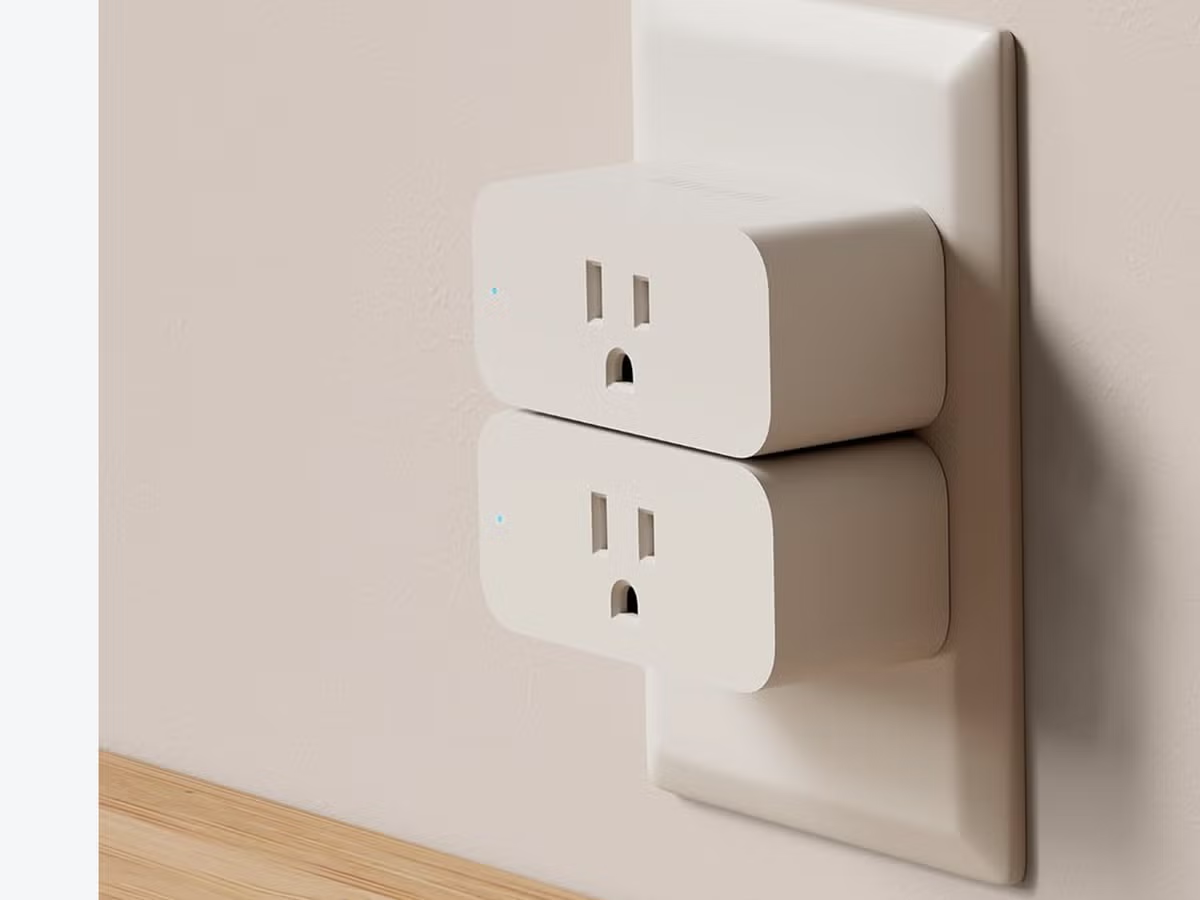
First Things First: Why Even Bother with a Smart Hub?
Before we dive into the nitty-gritty, let’s tackle a common question: “Can’t I just use a Wi-Fi smart plug without a hub?” Absolutely. Many great Wi-Fi plugs connect directly to your router. But pairing a plug with a dedicated smart hub unlocks a whole new level of smart home mastery. For see our smart home recommendations on this site.
Think of it this way: Wi-Fi plugs are like independent contractors. They do their job well, but they all report back to your Wi-Fi router individually. A smart hub, on the other hand, is the project manager. It brings all your devices—plugs, lights, sensors, locks—onto a dedicated team, allowing them to work together seamlessly.
Here’s why a hub is a major upgrade:
- Reduced Wi-Fi Congestion: Instead of dozens of devices clamoring for your router’s attention, many of them will communicate with the hub using different protocols like Zigbee or Z-Wave, freeing up your Wi-Fi bandwidth for streaming and browsing.
- Enhanced Reliability and Speed: Zigbee and Z-Wave create their own “mesh” networks. Each device can relay signals to the next, creating a super-stable and fast network that’s often more reliable than a crowded Wi-Fi network.
- Advanced Automations: This is the real magic. A hub allows you to create complex “if this, then that” scenarios. For example: If the front door sensor opens after sunset, then turn on the smart plug connected to the living room lamp. This level of interoperability is the heart of a truly smart home.
- Unified Control: Instead of juggling multiple apps for different brands, a smart hub brings everything under one roof. You can control your entire home from a single app.
The Pre-Flight Checklist: What to Do Before You Connect
A little preparation goes a long way. Running through this checklist will save you potential headaches and make the process of connecting your smart plug to your smart hub a breeze. I learned this the hard way after spending 20 minutes trying to pair a device that was simply out of range.
- Check for Compatibility: This is the most crucial step. Not all plugs work with all hubs. Check the protocols. Is your smart plug a Zigbee device? Then it needs a Zigbee-compatible hub (like an Amazon Echo with a built-in hub, or a Samsung SmartThings hub). Is it Z-Wave? Same story. The new Matter standard aims to solve this, but for now, you must match the plug’s protocol to the hub’s.
- Consider Your Location: Make sure the smart plug is within a reasonable range of your smart hub, at least for the initial setup. A distance of 15-30 feet (about 5-10 meters) is a good starting point.
- Power It Up: Plug your smart plug into a wall outlet. You should see an indicator light blink or turn on, signaling it has power and is ready for pairing.
- Get Your Apps Ready: Have your smart hub’s app downloaded and open on your smartphone or tablet. Whether it’s the Amazon Alexa app, Google Home, Apple Home, or Samsung SmartThings, make sure it’s updated to the latest version.
- Know Your Wi-Fi Password: While the plug might not connect directly to your Wi-Fi, your hub and your phone do. You’ll need to be on the same network for the setup to work.
How to Connect Smart Plug to Smart Hub: The Step-by-Step Guide
Alright, let’s get down to business. The exact steps can vary slightly between brands, but this universal process covers 99% of setups.
- Activate Pairing Mode on the Smart Plug: This is how you tell the plug, “Hey, I’m ready to connect!” Most smart plugs have a physical button on the side or front. To enter pairing mode, you typically need to press and hold this button for 5-10 seconds. The indicator light will usually start blinking rapidly to confirm it’s in discovery mode. If you’re unsure, a quick peek at the plug’s manual will tell you the exact method.
- Open Your Smart Hub’s Application: Launch the app that controls your smart hub. This could be the Alexa app, Google Home, or the dedicated app for a hub like Hubitat or SmartThings.
- Initiate the Device Discovery Process: Navigate to the section for adding a new device. The wording will be slightly different depending on the app:
- In the Amazon Alexa App: Tap “Devices” in the bottom right, then the “+” icon in the top right. Select “Add Device,” then “Plug.”
- In the Google Home App: Tap the “+” icon in the top left, select “Set up device,” then “New device.”
- In the Samsung SmartThings App: Tap the “+” icon and select “Add device.” You can often choose to “Scan for nearby devices.”
- Let the Hub Find Your Plug: Your hub will now start scanning for new devices in pairing mode. This process can take anywhere from a few seconds to a minute. Be patient. Your app should show a progress indicator.
- Select and Configure Your New Plug: Once found, your smart plug will appear in the list of discovered devices. Tap on it to select it. The app will then guide you through the final steps:
- Confirm the connection.
- Assign it a name. Be descriptive! Instead of “Smart Plug 3,” use “Living Room Lamp” or “Coffee Pot.” This is especially important for voice commands. You don’t want to have to which plug is which.
- Assign it to a room or group. Placing it in a room like “Bedroom” or “Kitchen” allows you to control multiple devices at once (e.g., “Alexa, turn off all the kitchen lights”).
- Test It Out! This is the satisfying part. Once the setup is complete, try turning the plug on and off from within the app. Then, use a voice command: “Hey Google, turn on the coffee pot.” If the little light on the plug clicks on and your appliance whirs to life, congratulations! You’ve successfully learned how to connect a smart plug to a smart hub.
What if It Doesn’t Connect? Common Troubleshooting Fixes
Technology can be finicky. If your plug refuses to connect, don’t throw it at the wall. Run through these simple troubleshooting steps first.
- Bring Them Closer: The most common issue is range. Move the smart plug to an outlet closer to your hub for the setup process. You can move it back to its desired location after it’s connected.
- Perform a Factory Reset: The plug might be stuck in a weird state. To reset it, you usually follow the same process as putting it in pairing mode (press and hold the button), but you might need to hold it for longer (15-20 seconds) until the light flashes in a specific way.
- Check the Protocol (Again): Double-check that you’re not trying to connect a Z-Wave plug to a hub that only supports Zigbee. It’s a simple mistake to make.
- Reboot Everything: The classic IT solution for a reason. Unplug your smart plug, wait 10 seconds, and plug it back in. Do the same for your smart hub and even your Wi-Fi router. A fresh start can clear up mysterious glitches.
“The true power of a smart home isn’t in a single device; it’s in the blend of devices working together. The smart hub is the conductor, ensuring every instrument—every plug, every bulb—plays its part in perfect harmony. Getting that initial connection right is the first note in your automated masterpiece.”
— Dr. Alistair Finch, Smart Home Futurist and Tech Analyst
Beyond On and Off: Creative Uses for Your Newly Connected Plug
Now that your plug is part of the team, you can do so much more than just turn things on and off with your voice. Here are a few ideas to get your creative juices flowing:
- The “Good Morning” Routine: Link your smart plug (connected to a coffee maker or bedside lamp) to your morning alarm. When you dismiss the alarm, the coffee starts brewing automatically.
- The Energy Saver: Connect “phantom power” culprits like entertainment centers or computer setups to a smart plug. Set a schedule to have it automatically turn off completely overnight, saving you money on your electricity bill.
- The Security Guard: When you’re on vacation, use your hub’s app to create a routine that randomly turns lamps connected to smart plugs on and off in the evening, making it look like someone is home.
- The Climate Controller: Plug a simple “dumb” fan or a window AC unit into a smart plug. Now, you can integrate it with a smart thermostat or temperature sensor. If the room gets too hot, the hub can automatically turn on the fan.
Frequently Asked Questions (FAQ)
Do all smart plugs need a smart hub?
|
Our Picks for the Best Smart Plug in 2026
As an Amazon Associate, we earn from qualifying purchases.
|
||
| Num | Product | Action |
|---|---|---|
| 1 | Kasa Smart Plug Mini 15A, Smart Home Wi-Fi Outlet Works with Alexa, Google Home & IFTTT, No Hub Required, UL Certified, 2.4G WiFi Only, 4-Pack(EP10P4) , White |

|
| 2 | Kasa Smart Plug Ultra Mini 15A, Smart Home Wi-Fi Outlet Works with Alexa, Google Home & IFTTT, No Hub Required, UL Certified, 2.4G WiFi Only, 2 Count (Pack of 1)(EP10P2) , White |
|
| 3 | Govee Smart Plug, WiFi Plugs Work with Alexa & Google Assistant, Smart Outlet with Timer & Group Controller, WiFi Outlet for Home, No Hub Required, ETL & FCC Certified, 2.4G WiFi Only, 4 Pack |
|
| 4 | Kasa Smart Plug HS103P2, Smart Home Wi-Fi Outlet Works with Alexa, Echo, Google Home & IFTTT, No Hub Required, Remote Control,15 Amp,UL Certified, (Pack of 2) White |
|
| 5 | Govee Smart Plug, WiFi Plugs Work with Alexa & Google Assistant, Smart Outlet with Timer & Group Controller, WiFi Outlet for Home, No Hub Required, ETL & FCC Certified, 2.4G WiFi Only, 2 Pack |
|
| 6 | Kasa Smart Plug Mini 15A, Apple HomeKit Supported, Smart Outlet Works with Siri, Alexa & Google Home, UL Certified, App Control, Scheduling, Timer, 2.4G WiFi Only, 4 Count (Pack of 1) (EP25P4), White |
|
| 7 | Amazon Basics Smart Plug, Works with Alexa Only, 2.4 GHz Wi-Fi, No Hub Required, 4-Pack, White |
|
| 8 | TP-Link Tapo Matter Supported Smart Plug Mini, Compact Design, 15A/1800W Max, Super Easy Setup, Works with Apple Home, Alexa & Google Home, UL Certified, 2.4G Wi-Fi Only, White, Tapo P125M(3-Pack) |
|
| 9 | Amazon Basics Smart Plug, Works with Alexa Only, 2.4 GHz Wi-Fi, No Hub Required, 2 Pack, White |
|
| 10 | Kasa Smart Plug HS103P4, Smart Home Wi-Fi Outlet Works with Alexa, Echo, Google Home & IFTTT, No Hub Required, Remote Control, 15 Amp, UL Certified, 4-Pack, White |
|
No, not all smart plugs require a smart hub. Many Wi-Fi-based smart plugs connect directly to your home’s Wi-Fi network and can be controlled via their own app or integrated with voice assistants like Alexa or Google Assistant. Hub-dependent plugs typically use protocols such as Zigbee or Z-Wave, which necessitate a compatible hub for operation.
Can I connect a Wi-Fi smart plug to my Zigbee hub?
Generally, no, you cannot connect a Wi-Fi smart plug directly to a Zigbee hub because they use different communication protocols. Wi-Fi plugs operate over your standard Wi-Fi network, while Zigbee hubs are designed to listen for Zigbee signals. Compatibility between the plug’s protocol and the hub’s supported protocols is essential for a successful connection.
What is Matter and how does it change things?
Matter is a new, universal smart home standard supported by major technology companies including Apple, Google, and Amazon, designed to improve device interoperability. Its goal is to allow all Matter-certified smart home devices to work together seamlessly, regardless of brand, which will significantly simplify the process of connecting smart plugs to smart hubs in the future.
How far can my smart plug be from the hub?
The typical indoor range for smart plugs using Zigbee or Z-Wave protocols is approximately 30-60 feet (10-20 meters), though this can be influenced by physical obstructions like walls. These protocols often utilize a mesh network, meaning that adding more compatible devices can extend the overall range and strengthen the network as devices relay signals to one another.
Is it safe to connect any appliance to a smart plug?
No, it is not safe to connect any appliance to a smart plug without checking its power rating. Each smart plug has a maximum amperage and wattage rating, such as 15 Amps or 1800 Watts. They are suitable for low-to-medium draw appliances like lamps, fans, and coffee makers, but should never be used for high-power devices like refrigerators, space heaters, or washing machines unless the specific plug is explicitly rated for such heavy loads.
Your Smart Home Awaits
Connecting a smart plug to a hub is your true entry point into a smarter, more automated lifestyle. It’s the moment you go from having a collection of cool gadgets to having an intelligent, responsive home ecosystem. By following these steps, you can tackle the setup with confidence. Now that you have the knowledge on how to connect a smart plug to a smart hub, the only thing left to do is to start imagining all the ways you can automate your daily life. Go ahead, get connecting, and welcome to the future.
Frequently Asked Questions
Do all smart plugs need a smart hub?
No, not all smart plugs require a smart hub. Many Wi-Fi-based smart plugs connect directly to your home's Wi-Fi network and can be controlled via their own app or integrated with voice assistants like Alexa or Google Assistant. Hub-dependent plugs typically use protocols such as Zigbee or Z-Wave, which necessitate a compatible hub for operation.
Can I connect a Wi-Fi smart plug to my Zigbee hub?
Generally, no, you cannot connect a Wi-Fi smart plug directly to a Zigbee hub because they use different communication protocols. Wi-Fi plugs operate over your standard Wi-Fi network, while Zigbee hubs are designed to listen for Zigbee signals. Compatibility between the plug's protocol and the hub's supported protocols is essential for a successful connection.
What is Matter and how does it change things?
Matter is a new, universal smart home standard supported by major technology companies including Apple, Google, and Amazon, designed to improve device interoperability. Its goal is to allow all Matter-certified smart home devices to work together seamlessly, regardless of brand, which will significantly simplify the process of connecting smart plugs to smart hubs in the future.
How far can my smart plug be from the hub?
The typical indoor range for smart plugs using Zigbee or Z-Wave protocols is approximately 30-60 feet (10-20 meters), though this can be influenced by physical obstructions like walls. These protocols often utilize a mesh network, meaning that adding more compatible devices can extend the overall range and strengthen the network as devices relay signals to one another.
Is it safe to connect any appliance to a smart plug?
No, it is not safe to connect any appliance to a smart plug without checking its power rating. Each smart plug has a maximum amperage and wattage rating, such as 15 Amps or 1800 Watts. They are suitable for low-to-medium draw appliances like lamps, fans, and coffee makers, but should never be used for high-power devices like refrigerators, space heaters, or washing machines unless the specific plug is explicitly rated for such heavy loads.
Smart home that does not lock you in
Free PDF — protocol compatibility matrix for 30 hubs and devices.
The instructions for pairing my smart plug with my Z-Wave hub were mostly good. I had a bit of trouble getting the device discovery to work initially, and it took a few tries to get the plug recognized. Once it connected, it’s been fine, but that first part was a little frustrating. Still, it’s nice to have everything in one app.
I was hesitant to get a smart hub for just a few plugs, but after reading about the benefits, I went for it. The step-by-step guide for connecting my Zigbee smart plug was super clear. Now I have all my lights on a schedule and can control them even when my Wi-Fi is a bit spotty. It’s made a huge difference in managing my energy use.
I’ve been using Wi-Fi plugs for a while, but the idea of reduced Wi-Fi congestion really appealed to me. Following the steps to connect my new smart plug to my existing hub was straightforward. It’s great to have more reliable connections for my automations, especially for things like my coffee maker in the morning. Definitely worth the extra effort.
This was exactly what I needed! I’ve been wanting to integrate my smart plugs into a unified smart home ecosystem for ages, but always put it off. The explanation of why a hub is better than just standalone Wi-Fi plugs really convinced me. The process was smooth, and now I have centralized control over everything. My home feels so much smarter.