A smart plug is the perfect housewarming gift because it offers immediate convenience, enhanced security, and potential energy savings, making it a practical and modern present for new homeowners. This small device transforms any standard appliance into a smart one, allowing remote control via a smartphone app, voice commands, and automated scheduling. It’s an affordable and simple entry point into smart home technology, providing tangible benefits from day one.
What Exactly Is a Smart Plug, Anyway?
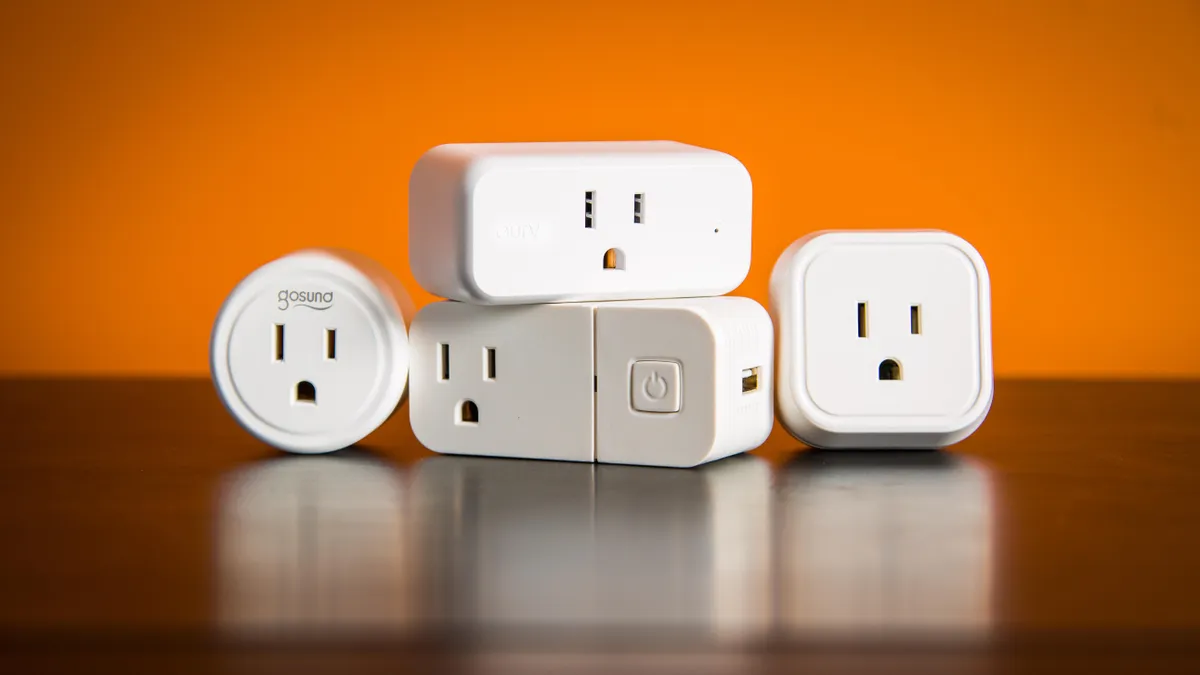
A smart plug is a simple device that you plug into a regular electrical outlet. You then plug another device, like a lamp, a coffee maker, or a fan, into the smart plug. In essence, it acts as a smart adapter, giving you remote control over any “dumb” appliance and turning it into a smart one.
Think of it as a remote control for your power sockets. Using a smartphone app, you can turn the connected device on or off from anywhere in the world, as long as you have an internet connection. Most smart plugs also allow you to set schedules, create timers, and even control them with your voice through assistants like Amazon Alexa or Google Assistant. It’s the simplest and most affordable entry point into home automation.
Why a Smart Plug as a Housewarming Gift is a Brilliant Idea
Moving into a new place is exciting but also chaotic. A smart plug is a gift that helps new homeowners or renters immediately feel more in control and settled in their new space. It’s not just a gadget; it’s a problem-solver.
Here’s why it’s such a home run:
- Ultimate Convenience: Imagine your friend is heading home on a dark evening. With a tap on their phone, they can turn on a lamp inside, so they never have to walk into a dark house again. Or they can schedule their coffee maker to start brewing five minutes before their alarm goes off. It’s about creating small moments of magic and ease in a daily routine.
- Peace of Mind and Security: Did I leave the hair straightener on? This common anxiety vanishes with a smart plug. A quick check of the app provides instant peace of mind. Even better, they can use it to schedule lights to turn on and off randomly when they’re on vacation, creating the illusion that someone is home. This feature, often called “Away Mode,” is a simple but effective security deterrent.
- Energy and Cost Savings: Smart plugs can help manage energy consumption. Your friend can easily set schedules to ensure devices aren’t left running unnecessarily. Some advanced models even offer energy monitoring, showing exactly how much power a connected appliance is using. This helps identify energy-hungry devices and can lead to real savings on the electricity bill—a welcome perk for any new homeowner.
- The Perfect Smart Home “Gateway Drug”: For someone curious about smart home technology but intimidated by the cost or complexity, a smart plug is the perfect first step. It’s affordable, incredibly easy to set up, and delivers immediate benefits. Gifting a smart plug as a housewarming gift could be the spark that ignites their passion for a fully automated home.
I’ll never forget my first smart plug. I connected it to a simple floor lamp in my living room. The first time I said, “Hey Google, turn on the living room light,” and it instantly illuminated the room, it felt like I was living in the future. It’s that simple, tangible benefit that makes it such a fantastic gift.
How to Choose the Right Smart Plug for a Gift
Not all smart plugs are created equal. To ensure your gift is a hit, here are a few key things to consider.
Compatibility is King
|
Our Picks for the Best Smart Plug in 2026
As an Amazon Associate, we earn from qualifying purchases.
|
||
| Num | Product | Action |
|---|---|---|
| 1 | Amazon Basics Smart Plug, Works with Alexa Only, 2.4 GHz Wi-Fi, No Hub Required, 2 Pack, White |

|
| 2 | Kasa Smart Plug HS103P2, Smart Home Wi-Fi Outlet Works with Alexa, Echo, Google Home & IFTTT, No Hub Required, Remote Control,15 Amp,UL Certified, (Pack of 2) White |
|
| 3 | Kasa Smart Plug Mini 15A, Apple HomeKit Supported, Smart Outlet Works with Siri, Alexa & Google Home, UL Certified, App Control, Scheduling, Timer, 2.4G WiFi Only, 4 Count (Pack of 1) (EP25P4), White |
|
| 4 | TP-Link Tapo Matter Supported Smart Plug Mini, Compact Design, 15A/1800W Max, Super Easy Setup, Works with Apple Home, Alexa & Google Home, UL Certified, 2.4G Wi-Fi Only, White, Tapo P125M(3-Pack) |
|
| 5 | Govee Smart Plug, WiFi Plugs Work with Alexa & Google Assistant, Smart Outlet with Timer & Group Controller, WiFi Outlet for Home, No Hub Required, ETL & FCC Certified, 2.4G WiFi Only, 4 Pack |
|
| 6 | Govee Smart Plug, WiFi Plugs Work with Alexa & Google Assistant, Smart Outlet with Timer & Group Controller, WiFi Outlet for Home, No Hub Required, ETL & FCC Certified, 2.4G WiFi Only, 2 Pack |
|
| 7 | Kasa Smart Plug HS103P4, Smart Home Wi-Fi Outlet Works with Alexa, Echo, Google Home & IFTTT, No Hub Required, Remote Control, 15 Amp, UL Certified, 4-Pack, White |
|
| 8 | Kasa Smart Plug Mini 15A, Smart Home Wi-Fi Outlet Works with Alexa, Google Home & IFTTT, No Hub Required, UL Certified, 2.4G WiFi Only, 4-Pack(EP10P4) , White |
|
| 9 | Kasa Smart Plug Ultra Mini 15A, Smart Home Wi-Fi Outlet Works with Alexa, Google Home & IFTTT, No Hub Required, UL Certified, 2.4G WiFi Only, 2 Count (Pack of 1)(EP10P2) , White |
|
| 10 | Amazon Basics Smart Plug, Works with Alexa Only, 2.4 GHz Wi-Fi, No Hub Required, 4-Pack, White |
|
This is the most crucial factor. Does your friend use an iPhone or an Android? Are they already in the Amazon Alexa, Google Home, or Apple HomeKit ecosystem?
- For most people: A plug that works with both Amazon Alexa and Google Assistant is a safe bet, as these are the most common platforms. Brands like TP-Link Kasa and Wyze are excellent choices here.
- For Apple enthusiasts: Look specifically for a plug that is compatible with Apple HomeKit. This will allow for seamless integration with their iPhone, iPad, and Siri.
- If you’re unsure: Choose a plug with its own dedicated, user-friendly app that doesn’t require a voice assistant to function. This way, they can get started right away using just their smartphone.
Size and Shape Matter
Some older, bulkier smart plugs can block the second outlet in a standard wall socket. Look for a modern, compact design—often circular or a slim rectangle—that leaves the other outlet free. This is a small detail that makes a huge difference in usability.
Check the Power Rating
Most standard smart plugs are designed for small appliances like lamps, fans, and chargers. If you think your friend might want to use it for something more power-hungry, like a space heater or a window air conditioner, you’ll need to check the plug’s maximum amperage rating. A 15-amp plug is generally required for these high-draw appliances.
A Quick Note on Plug Types and Voltage
If you’re buying a gift for someone in another country, remember to check the local standard. In the US and Canada, the standard is Type B. In the UK, it’s Type G. Gifting a plug that doesn’t physically fit the outlets is a classic blunder! Thankfully, most smart plugs sold within a specific region are designed for its voltage standards (e.g., 120V in North America, 230V in Europe).
Getting Started: A Super Simple Setup Guide
One of the best things about a smart plug is how easy it is to set up. You can even include these simple instructions in your gift card to make it even more welcoming.
- Unbox and Plug In: Take the smart plug out of the box and plug it into a desired wall outlet. A small light will usually flash to indicate it’s in setup mode.
- Download the App: Scan the QR code on the box or search for the manufacturer’s app (e.g., Kasa Smart, Wyze) in the Apple App Store or Google Play Store.
- Create an Account: Open the app and follow the prompts to create a new account. This usually just requires an email and a password.
- Connect to Wi-Fi: Follow the in-app instructions to connect the smart plug to their home Wi-Fi network. This typically involves selecting the plug from a list of devices and entering the Wi-Fi password. It’s a process that takes less than five minutes.
- Name Your Device and Start Automating! Give the plug a name, like “Living Room Lamp” or “Coffee Pot.” That’s it! They can now control it from the app or link it to their favorite voice assistant.
Creative Ways Your Friend Can Use Their New Smart Plug
The real fun begins once the plug is set up. Here are some creative ideas you can share with them to get their imagination going:
- The Morning Coffee Automator: Connect the plug to a drip coffee maker. Schedule it to turn on at 7:00 AM, and they’ll wake up to the smell of freshly brewed coffee every morning.
- The “Did I Leave the Iron On?” Savior: For peace of mind, connect hair straighteners, curling irons, or clothing irons to the smart plug. They can check the app and turn it off from the office if they ever forget.
- The Cozy Evening Creator: Plug in a set of string lights or an accent lamp. They can schedule them to turn on automatically at sunset, creating a warm, welcoming ambiance every evening.
- The Holiday Hero: During the holidays, connect Christmas tree lights or other decorations to the smart plug. No more crawling behind the tree to plug them in and out!
- The Gentle Wake-Up Call: Instead of a jarring alarm, they can plug a lamp into the smart plug and schedule it to fade on slowly in the morning, mimicking a natural sunrise.
Integrating into a Bigger Smart Home Ecosystem
A single smart plug is great, but its true power is unlocked when it becomes part of a larger system.
“The humble smart plug is the building block of the modern automated home,” says smart home technology analyst Dr. Alistair Finch. “It democratizes home automation. It’s not about complex wiring or expensive hubs anymore; it’s about accessible, interconnected devices that work together to simplify your life. Starting with a plug is the smartest move a beginner can make.”
Most smart plugs integrate seamlessly with major ecosystems:
- Amazon Alexa: Once linked, your friend can say, “Alexa, turn on the fan.” They can also group the smart plug with other devices to create routines, like a “Good Night” routine that turns off all the lights and the TV with a single command.
- Google Home: The experience is very similar. They can say, “Hey Google, start the coffee maker.” Google’s routines also allow for powerful automation, linking plugs to other smart devices like thermostats and speakers.
- Apple HomeKit: For those in the Apple world, HomeKit integration allows control through the Home app and Siri. They can create “Scenes,” such as a “Movie Night” scene that dims the lights (connected to a smart plug) and turns on the TV.
Frequently Asked Questions
Do smart plugs use a lot of electricity when idle?
No, they use a very small amount of power in standby mode, typically less than 1 watt. The energy savings from preventing larger appliances from running unnecessarily far outweighs the minimal power consumption of the plug itself.
Do I need a special hub for a smart plug to work?
Most modern smart plugs connect directly to your home’s Wi-Fi network and do not require a separate hub. However, some systems, like those using Zigbee or Z-Wave protocols, do require a hub, so it’s best to stick with a Wi-Fi-enabled model for a gift unless you know they already have a compatible hub.
Are smart plugs safe to use?
Yes, as long as you buy from a reputable brand that is certified by safety standards organizations like UL or ETL. These certifications ensure the product has been tested for safety and won’t overheat or pose a fire risk.
Can a smart plug be used outdoors?
Only if it is specifically rated for outdoor use. Outdoor smart plugs are built to be weather-resistant to withstand rain, dust, and temperature changes. Using an indoor plug outside is a safety hazard.
What happens if the internet goes down?
If the internet connection is lost, you won’t be able to control the smart plug remotely from your phone app or with voice commands. However, any schedules or timers stored directly on the device itself will usually continue to function. Most plugs also have a physical on/off button for manual control.
The Smartest, Simplest Gift
In a world of fleeting digital gifts and generic home goods, a smart plug stands out. It’s a practical, thoughtful, and forward-thinking present that offers daily convenience and a touch of modern magic. By giving a smart plug as a housewarming gift, you’re not just giving a gadget; you’re giving your friend a more convenient, secure, and efficient home, one outlet at a time. It’s the perfect way to help them start this new chapter on a smart and connected note.
Frequently Asked Questions
Do smart plugs consume a lot of electricity when they are not actively in use?
No, smart plugs use very little power in standby mode, typically less than 1 watt. The minimal power consumption of the plug itself is significantly outweighed by the energy savings achieved by preventing larger appliances from running unnecessarily.
Is a special smart home hub required for a smart plug to function?
Most modern smart plugs connect directly to your home's Wi-Fi network and do not require a separate hub. However, some systems utilizing Zigbee or Z-Wave protocols do need a hub, so it's advisable to choose a Wi-Fi-enabled model for a gift unless a compatible hub is already present.
Are smart plugs safe for everyday use in a home environment?
Yes, smart plugs are safe to use, provided they are purchased from a reputable brand with safety certifications like UL or ETL. These certifications confirm that the product has undergone testing for safety and does not pose risks such as overheating or fire hazards.
Can smart plugs be utilized in outdoor settings?
Smart plugs can only be used outdoors if they are specifically rated for outdoor conditions. Outdoor smart plugs are designed to be weather-resistant, capable of withstanding rain, dust, and temperature fluctuations. Using an indoor plug outside creates a significant safety hazard.
What happens to smart plug functionality if the internet connection is lost?
If the internet connection is lost, remote control of the smart plug via a phone app or voice commands will be unavailable. However, any schedules or timers that are stored directly on the device itself will typically continue to operate. Most plugs also include a physical on/off button for manual control.
Smart home that does not lock you in
Free PDF — protocol compatibility matrix for 30 hubs and devices.
I got a few smart plugs as a housewarming gift last year and they’ve been a game-changer! I love being able to turn off my curling iron from work, or schedule my coffee maker to start brewing before I even get out of bed. It’s such a simple way to add convenience without having to replace all my appliances. Definitely recommend them for anyone setting up a new home.
These smart plugs are pretty great for automating things around the house. I’ve got one on my living room lamp and another on a fan, and the scheduling feature is super handy for saving energy. My only minor complaint is that the app can sometimes be a little slow to connect, but once it does, everything works perfectly. Still a solid gift idea.
I received a smart plug and while the idea of turning a ‘dumb’ appliance into a smart one is cool, I found the setup a bit more fiddly than I expected. It took me a couple of tries to get it connected to my Wi-Fi, and the voice command integration with my existing smart speaker wasn’t as seamless as I hoped. It works now, but the initial experience was a little frustrating.
I bought a pack of these for my sister’s new apartment and she absolutely loves them! She’s been using them to control her string lights on her patio and even her slow cooker when she’s running late. It’s such an affordable entry point into smart home tech and really does provide immediate benefits. Great practical gift.