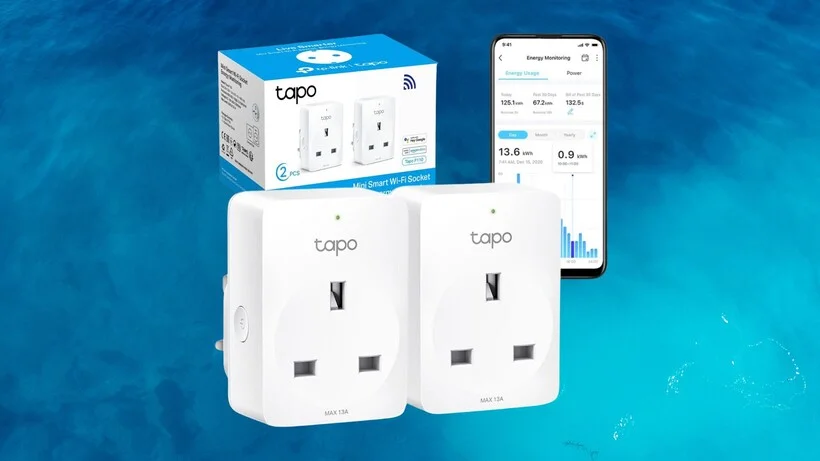
An indoor smart plug is a device that connects to a standard wall outlet, allowing you to control any plugged-in appliance remotely via a smartphone app, voice commands, or automated schedules. These Wi-Fi-connected gadgets serve as an affordable and essential entry point into home automation, enabling functions like scheduling coffee makers, enhancing home security with randomized lighting, and reducing energy consumption from “vampire power” by turning off electronics completely. They have evolved from clunky mechanical timers to sleek, internet-connected devices, making smart home integration accessible for everyone.
A Quick Trip Down Memory Lane: The Evolution of Smart Plugs
Believe it or not, the idea of automating our outlets isn’t brand new. For decades, we had those clunky mechanical timers with little plastic pins you’d push in to set a schedule. They worked, but they were a pain to set up and offered zero flexibility. Fast forward to today, and the smart plug is the sleek, Wi-Fi-connected descendant of those old-school timers. They’ve gone from a niche gadget for tech enthusiasts to an essential, affordable entry point into the world of home automation. For explore our smart home reviews on this site.
So, How Do These Little Gadgets Actually Work?
At its core, a smart plug is a simple but brilliant device. You plug it into a standard wall outlet, and then you plug your “dumb” appliance—like a lamp, a fan, or a coffee maker—into the smart plug. The smart plug itself connects to your home’s Wi-Fi network, acting as a bridge between the internet and your appliance. This allows you to turn the appliance on or off from anywhere in the world using an app on your smartphone.
Think of it like a remote-controlled light switch for any device. But instead of a physical remote, you have an app, your voice, or automated schedules doing the work for you.
While most smart plugs use Wi-Fi, which is super convenient as you don’t need extra hardware, some use other communication protocols like Zigbee or Z-Wave. These typically require a central “hub” but can create a more robust and responsive local network, especially if you have dozens of smart devices. With the rise of the new Matter standard, we’re seeing even better interoperability between brands, making it easier than ever to build a cohesive smart home.
Beyond On/Off: Creative Ways to Use Your Indoor Smart Plug
This is where the real fun begins. A smart plug is so much more than a remote power button. Here are some of my favorite ways to use them:
- The Perfect Morning Routine: Plug your coffee maker into a smart plug and schedule it to turn on at 6:55 AM. You’ll wake up to the smell of freshly brewed coffee every single day. It’s a game-changer.
- “Faux-Occupancy” Security: Going on vacation? Use the “Away Mode” feature in the app to have your lamps turn on and off randomly in the evening, making it look like someone is home.
- Effortless Holiday Spirit: Connect your holiday lights to a smart plug and set them on a timer. No more crawling behind the tree to plug them in or forgetting to turn them off.
- Curbing Screen Time: Plug your kids’ TV or gaming console into a smart plug and set a schedule. When screen time is over, the power goes off. You’ll become the master of the clock.
- Protect Your Electronics: Connect expensive electronics to a smart plug and create a routine to turn them off completely at night, protecting them from power surges and saving energy.
The Big Question: Do Smart Plugs Really Save You Money?
Yes, they absolutely can, especially when you use them to tackle “vampire power” or “phantom load.” This is the energy that electronics consume even when they’re turned off but still plugged in. Your TV, stereo system, and device chargers are common culprits. An indoor smart plug review wouldn’t be complete without highlighting this benefit. By scheduling these devices to power off completely when not in use (like overnight), you can genuinely cut down on your electricity bill. Plugs with built-in energy monitoring are fantastic for this, as they show you exactly how much power a device is using.
Your Complete Indoor Smart Plug Review Checklist
When you’re ready to buy, it’s easy to get overwhelmed. Keep these key factors in mind to make the right choice for your home.
Compatibility is King: Alexa, Google, or Apple?
|
Our Picks for the Best Smart Plug in 2026
As an Amazon Associate, we earn from qualifying purchases.
|
||
| Num | Product | Action |
|---|---|---|
| 1 | Govee Smart Plug, WiFi Plugs Work with Alexa & Google Assistant, Smart Outlet with Timer & Group Controller, WiFi Outlet for Home, No Hub Required, ETL & FCC Certified, 2.4G WiFi Only, 4 Pack |

|
| 2 | Amazon Basics Smart Plug, Works with Alexa Only, 2.4 GHz Wi-Fi, No Hub Required, 2 Pack, White |
|
| 3 | Kasa Smart Plug Mini 15A, Smart Home Wi-Fi Outlet Works with Alexa, Google Home & IFTTT, No Hub Required, UL Certified, 2.4G WiFi Only, 4-Pack(EP10P4) , White |
|
| 4 | Kasa Smart Plug Ultra Mini 15A, Smart Home Wi-Fi Outlet Works with Alexa, Google Home & IFTTT, No Hub Required, UL Certified, 2.4G WiFi Only, 2 Count (Pack of 1)(EP10P2) , White |
|
| 5 | Amazon Basics Smart Plug, Works with Alexa Only, 2.4 GHz Wi-Fi, No Hub Required, 4-Pack, White |
|
| 6 | Kasa Smart Plug HS103P4, Smart Home Wi-Fi Outlet Works with Alexa, Echo, Google Home & IFTTT, No Hub Required, Remote Control, 15 Amp, UL Certified, 4-Pack, White |
|
| 7 | TP-Link Tapo Matter Supported Smart Plug Mini, Compact Design, 15A/1800W Max, Super Easy Setup, Works with Apple Home, Alexa & Google Home, UL Certified, 2.4G Wi-Fi Only, White, Tapo P125M(3-Pack) |
|
| 8 | Govee Smart Plug, WiFi Plugs Work with Alexa & Google Assistant, Smart Outlet with Timer & Group Controller, WiFi Outlet for Home, No Hub Required, ETL & FCC Certified, 2.4G WiFi Only, 2 Pack |
|
| 9 | Kasa Smart Plug HS103P2, Smart Home Wi-Fi Outlet Works with Alexa, Echo, Google Home & IFTTT, No Hub Required, Remote Control,15 Amp,UL Certified, (Pack of 2) White |
|
| 10 | Kasa Smart Plug Mini 15A, Apple HomeKit Supported, Smart Outlet Works with Siri, Alexa & Google Home, UL Certified, App Control, Scheduling, Timer, 2.4G WiFi Only, 4 Count (Pack of 1) (EP25P4), White |
|
The most important factor is ensuring the plug works with your preferred smart home ecosystem. Most plugs work with Amazon Alexa and Google Assistant, but compatibility with Apple HomeKit can be less common and sometimes more expensive. Check the box or product description for the logos of the voice assistants you use.
Size and Shape Matter
This is a surprisingly common oversight. Some smart plugs are so bulky that they block the second outlet on a standard wall plate (like a Type B in the US or a Type G in the UK). Look for compact or offset designs that leave your other outlet free.
Key Features to Look For
- Scheduling and Timers: The ability to set specific on/off times. This is a standard feature on virtually all smart plugs.
- Energy Monitoring: Tracks the power consumption of the connected device. Great for identifying energy hogs.
- Away Mode: Randomizes on/off times to simulate occupancy for security.
- Voice Control: Integration with Alexa, Google Assistant, or Siri.
- Physical Button: A manual on/off button on the plug itself is crucial for those times your Wi-Fi is down or your phone isn’t handy.
Don’t Forget About Safety
Always choose a smart plug that is safety certified for your region. In the United States, look for an ETL or UL certification mark. This ensures the product has been tested and meets critical safety standards to prevent overheating or electrical fires.
As technology expert Dr. Alistair Finch notes, “The goal of home automation isn’t just convenience; it’s about creating a safer, more efficient, and more responsive living environment. A well-chosen smart plug is the simplest, most effective first step on that journey.”
How Do I Integrate Smart Plugs Into My Smart Home Ecosystem?
Integrating your new smart plug is the final step to unlocking its full potential. Once you’ve set up the plug in its native app, you’ll connect that app’s account to your Alexa, Google Home, or Apple Home app.
This process, usually called “linking a skill” or “adding a service,” allows your central smart home app to discover and control the plug. Once linked, you can include the plug in “Routines” (Alexa/Google) or “Scenes” (Apple HomeKit). For example, you could create a “Good Night” routine that, with a single voice command, turns off your smart plug-connected lamps, locks your smart locks, and adjusts your smart thermostat.
Frequently Asked Questions About Indoor Smart Plugs
Do I need a smart home hub for a smart plug?
For most Wi-Fi-based smart plugs, you do not need a separate hub. They connect directly to your home’s Wi-Fi router. However, if you choose a Zigbee or Z-Wave plug, you will need a compatible hub like an Amazon Echo with a built-in hub or a dedicated hub from brands like Hubitat or SmartThings.
Can a smart plug damage my appliances?
No, a quality, safety-certified smart plug will not damage your appliances. It simply acts as a switch to control the flow of electricity. However, always ensure the plug’s maximum amperage rating is sufficient for the appliance you’re connecting. Most are rated for 10 or 15 amps, which is fine for lamps and fans but may not be suitable for high-draw appliances like space heaters.
What happens if my Wi-Fi goes out?
If your internet connection drops, you won’t be able to control the smart plug from your app or with your voice. However, any pre-set schedules are often stored locally on the plug itself and should continue to work. You can also always use the physical button on the plug to turn it on or off manually.
How secure are indoor smart plugs?
Security is a valid concern for any IoT device. Reputable brands regularly release firmware updates to patch vulnerabilities. To stay safe, always choose well-known brands, create a strong, unique password for the device’s app, and enable two-factor authentication if available.
Are all smart plugs the same size?
Definitely not. They come in various shapes and sizes, from small circles to larger rectangles. As mentioned earlier, always check the dimensions and user reviews to ensure a plug won’t block adjacent outlets, which is a common frustration.
Your First Step to a Smarter Home
From convenience and security to energy savings, the humble indoor smart plug packs a powerful punch. It’s the perfect, low-cost entry point into the exciting world of home automation, allowing you to experiment and discover what works for you without a major investment. We hope this indoor smart plug review has given you the confidence and knowledge to choose the right device and start building a more connected and intelligent home today. The future is here, and it’s as simple as plugging it in.
Frequently Asked Questions
Do I need a smart home hub for a smart plug?
For most Wi-Fi-based smart plugs, a separate hub is not required as they connect directly to your home's Wi-Fi router. However, Zigbee or Z-Wave plugs do need a compatible hub, such as an Amazon Echo with a built-in hub or a dedicated SmartThings hub.
Can a smart plug damage my appliances?
No, a quality, safety-certified smart plug will not damage your appliances; it simply controls the flow of electricity. Always ensure the plug's maximum amperage rating, typically 10 or 15 amps, is sufficient for the connected appliance to prevent issues.
What happens if my Wi-Fi goes out when using a smart plug?
If your internet connection drops, you will lose the ability to control the smart plug via its app or voice commands. However, any pre-set schedules are often stored locally on the plug itself and should continue to function. You can also use the physical button on the plug for manual control.
How secure are indoor smart plugs against cyber threats?
Security is a valid concern for any IoT device. Reputable smart plug brands regularly release firmware updates to patch vulnerabilities. To enhance security, always choose well-known brands, create strong, unique passwords for the device's app, and enable two-factor authentication if available.
Are all smart plugs the same size and shape?
No, smart plugs come in various shapes and sizes, from small circular designs to larger rectangular ones. It is important to check the dimensions and user reviews to ensure a plug will not block adjacent outlets on a standard wall plate, which is a common user frustration.
Smart home that does not lock you in
Free PDF — protocol compatibility matrix for 30 hubs and devices.
These plugs are a game-changer for home security. I travel a lot for work, and being able to randomize my lighting schedule makes it look like someone’s always home. It’s way better than those old mechanical timers I used to use, which were so obvious and clunky. Setup was pretty straightforward too, which was a relief.
I bought a few of these to control various appliances, and they’ve been fantastic. The voice command feature with my smart speaker is incredibly convenient, especially when my hands are full. It’s amazing how much easier it is to manage things around the house without having to physically interact with every switch. Great for busy households!
I’ve been wanting to get into home automation for a while, and these indoor smart plugs were the perfect starting point. I love being able to schedule my coffee maker to turn on before I even get out of bed. It’s such a small thing, but it makes my mornings so much smoother. Definitely recommend for anyone looking for an affordable entry into smart home tech.
The smart plugs are pretty good for the price, and I’ve noticed a slight dip in my energy bill from cutting out vampire power. My only real complaint is that the app can be a bit finicky sometimes. It occasionally takes a few tries to connect, which is a minor annoyance when I’m trying to turn off a lamp quickly. Otherwise, they do what they promise.